
PUBLIC X / TWITTER GIFS · REAL ANIMATED .GIF + NATIVE MP4 · 0 UPLOADS
X (Twitter) GIF Downloader
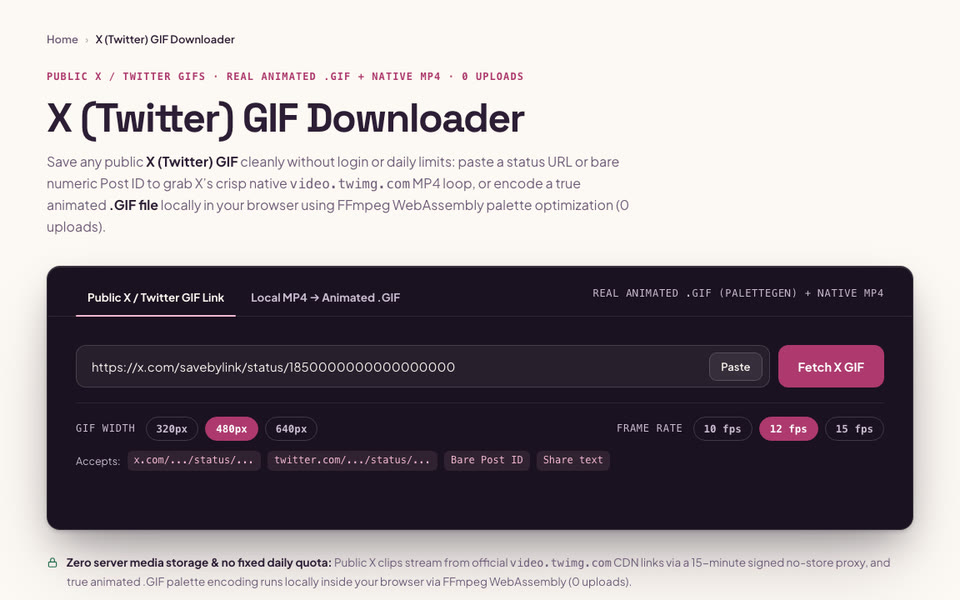
Save any public X (Twitter) GIF cleanly without login or daily limits: paste a status URL or bare numeric Post ID to grab X’s crisp native video.twimg.com MP4 loop, or encode a true animated .GIF file locally in your browser using FFmpeg WebAssembly palette optimization (0 uploads).
Drop a local MP4, MOV, or WebM clip to convert into an animated .GIF
Supports clips up to 100 MB (first 15s looped, warned before encode) · Two-pass palettegen/paletteuse runs 100% locally in RAM
Zero server media storage & no fixed daily quota: Public X clips stream from official video.twimg.com CDN links via a 15-minute signed no-store proxy, and true animated .GIF palette encoding runs locally inside your browser via FFmpeg WebAssembly (0 uploads).
01 · ARCHITECTURE
Why X "GIFs" Are Actually MP4s — And How SaveByLink Gives You Both
A technical detail most X (formerly Twitter) users only discover after trying to save a reaction meme: X has not served legacy .gif files on timelines since 2014. Whenever someone uploads an animated GIF to X, the platform immediately transcodes it into a silent looping H.264 MP4 hosted on video.twimg.com because MP4 is 80%–90% smaller and renders smoothly at 24-bit color.
That creates a real dilemma. Some X GIF downloader sites only hand you an .mp4 — which fails when you try to drop it into GitHub issues, Notion docs, Slack custom reactions, or old forum signatures that strictly require an image/gif. Other sites upload the clip to a slow server and hand back a blotchy, 12 MB unoptimized GIF. SaveByLink solves both cleanly: paste any public x.com or twitter.com status URL to download the razor-sharp native MP4 immediately, OR click Convert to Real .GIF Locally to run FFmpeg WebAssembly’s two-step palettegen + paletteuse Bayer dithering right inside your browser tab with zero server storage.
Dual-output pipeline: download X’s native MP4 loop with zero loss, or encode an adaptive-palette .GIF strictly inside browser memory.
02 · WORKFLOW & FORMAT MATH
How to Download an X (Twitter) GIF as MP4 or Animated .GIF in 3 Steps
- 01Copy the public X post link — or just the numeric Post ID: On the X mobile app or desktop browser, tap Share → Copy Link. SaveByLink automatically cleans
x.com/.../status/..., legacytwitter.com, share text, and even a bare numeric Tweet/Post ID (e.g.1850...) into a valid lookup. - 02Pick your output width (320, 480, or 640 px) and frame rate (10, 12, or 15 fps): Click Fetch X GIF to resolve the official
video.twimg.comstream. If you only need to repost on WhatsApp, iMessage, or Telegram, click Download Native MP4 right away — it loops cleanly at tiny file size. - 03Need an authentic
.gifimage? Convert locally and verify exact bytes: Tap Convert to Real .GIF Locally. FFmpeg WebAssembly warns you before encoding if a clip exceeds 15 seconds, builds a custom 128-color perceptual palette with Lanczos scaling right in your browser, previews the live looping animation alongside exact output width, fps, duration, and byte count, and writes the genuine.gifstraight to Downloads.
MP4 vs Real Animated .GIF: Measured Benchmarks, Color Depth & Compatibility
Because animated GIF uses 1987 LZW compression limited to at most 256 indexed colors per frame without inter-frame motion vectors, converting a 5-second X reaction clip to .gif always produces a larger file than X’s native H.264 MP4. Naive converters blindly dump 30 fps at full 720p width, creating an unusable 12–16 MB GIF that breaks Slack, GitHub, and email embeds.
SaveByLink’s browser FFmpeg pipeline defaults to 480 px width at 12 fps with stats_mode=diff custom palette generation (128 adaptive colors) and subtle Bayer dithering. Measured directly on our built-in 5.00-second 720p test clip (sample-demo-720p.mp4, 1,175,657 bytes / 1.12 MiB, tested 2026-11-25), our exact filtergraph outputs 1,136,543 bytes (1.08 MiB) at 320 px / 10 fps, 2,798,018 bytes (2.67 MiB) at 480 px / 12 fps, and 5,977,766 bytes (5.70 MiB) at 640 px / 15 fps — displaying the exact byte count and live looping preview before you click Download.
Real FFmpeg measurements (2026-11-25) on 5.00s 720p MP4 (1.12 MiB): 320px/10fps lands at 1.08 MiB, 480px/12fps at 2.67 MiB, and 640px/15fps at 5.70 MiB vs 12+ MB raw 30fps dumps.
03 · PRACTICAL SCENARIOS
Pick a GIF Preset & Jump Straight to the Workbench Stage

04 · TECHNICAL SPECIFICATIONS
Measured X GIF Output Matrix & Browser Encoder Specs
Table 1 below is expanded by default with real FFmpeg outputs measured 2026-11-25 on our 5.00s 720p test clip (1,175,657 B); expand Table 2 for filtergraph flags, quotas, and post boundaries.
| Output Preset | Measured 5s 720p Clip | Best Platform Targets | Trade-Off |
|---|---|---|---|
| Native X MP4 (Fastest) | 1,175,657 B (1.12 MiB) | iPhone Photos, Android Gallery, Telegram, WhatsApp, CapCut | Highest 24-bit clarity & full clip length; not accepted in strict image/gif fields |
| 320 px · 10 fps .GIF | 1,136,543 B (1.08 MiB) | Slack reactions, GitHub comments, email signatures, forums | Ultra-lightweight real .gif; slight softening on fine UI text |
| 480 px · 12 fps .GIF (Default) | 2,798,018 B (2.67 MiB) | Discord, Notion, Google Slides, blog embeds, PowerPoint | Best balance between crisp motion, 128-color palette accuracy, and weight |
| 640 px · 15 fps .GIF | 5,977,766 B (5.70 MiB) | Product docs, UI bug demos, high-DPI presentation decks | Silky motion and readable UI; watch 8–10 MB chat upload limits |
| Specification | SaveByLink X (Twitter) GIF Downloader |
|---|---|
| Supported Public Inputs | x.com/user/status/ID, twitter.com/user/status/ID, mobile.twitter.com, share captions, OR a bare numeric Post ID (e.g. 1850...) |
| CDN Security Allowlist | Strictly restricted to official video.twimg.com & pbs.twimg.com HTTPS endpoints |
| Local GIF Filtergraph | fps=12,scale=min(480,iw):-1:flags=lanczos,split[s0][s1];[s0]palettegen=max_colors=128:stats_mode=diff[p];[s1][p]paletteuse=dither=bayer:bayer_scale=3 |
| Clip Duration & Warning | Local .GIF conversion caps at first 15 seconds (-t 15) and warns you before encoding if a clip is longer; Native MP4 keeps full duration |
| Storage & Daily Quota | 0 bytes stored — 15-min signed no-store proxy; no fixed anonymous daily lookup quota (local conversions unlimited offline) |
| Explicit Non-Support | Protected/locked accounts, DM GIFs, static image tweets, X Spaces audio; multi-GIF/quoted posts resolve the primary post’s main video/GIF stream (paste the quoted post’s direct URL for its media) |
05 · SEND AS AN ACTUAL .GIF & HONEST BOUNDARIES
How to Save & Send Your Twitter GIF as an Actual .GIF (iPhone, Android, WhatsApp, Telegram & Discord)
Reaction GIF sweet-spot settings: Aim for 320–480 px width, 10–15 fps, infinite loop, real image/gif format, and a file size under 5 MB — our default 480 px · 12 fps preset hits this exact target (2.67 MiB on a 5-second 720p clip) with crisp adaptive colors.
How to send it as an actual .gif without chat apps converting it back into a video: On iPhone, save from Safari to Files → Browse → iCloud Drive / On My iPhone → Downloads (or Share → Save Image to Photos) and attach it. On Android, save to Downloads and attach the .gif. On WhatsApp, either pick the GIF or choose Attach → Document to preserve the raw .gif bytes; on Telegram, send it as a File (uncompressed) so Telegram does not convert it back into an MP4 video. On Discord and Email, attach or upload the .gif file directly.
Need to download a longer multi-minute X video in full 1080p MP4 with audio? Visit our dedicated X Video Downloader. Or if you want to shrink a heavy video clip directly under Discord’s 20 MB free tier or GitHub’s 10 MB cap without turning it into a GIF, use our Compress Video to 20MB or Compress Video to 10MB tools.
Three Honest Boundaries Before You Download
Public Primary Post Media Only
SaveByLink resolves only publicly visible X (Twitter) posts open without signing in. Protected accounts, DMs, and subscriber-only posts are never accessed. If a GIF lives inside a quoted post, open the quoted post directly and paste its status URL or ID.
15-Second Cap on Local .GIF Encoding
Animated GIF is built for short loops. To protect mobile Safari and Chrome RAM, local .GIF conversion encodes the first 15 seconds (and alerts you upfront when a clip exceeds 15s); save Native MP4 for full-length clips.
Respect Creator Attribution
Original copyright and attribution belong to the post creator or rights holder. Save GIFs strictly for personal use, commentary, documentation, or archiving your own published posts.
06 · FREQUENTLY ASKED QUESTIONS & RELATED TOOLS
X (Twitter) GIF Downloader FAQ
Why do X (Twitter) GIFs download as MP4 files on most websites?
X automatically converts uploaded GIFs into silent looping H.264 MP4 videos on video.twimg.com to save bandwidth and keep full 24-bit color. SaveByLink lets you download that sharp native MP4 OR genuinely encode it into a real infinite-loop animated .GIF locally in your browser (never a renamed MP4).
How do I send a saved Twitter GIF on WhatsApp or Telegram without it turning back into a video?
Some messaging apps automatically transcode uploaded GIFs back into looping MP4 videos for playback. To preserve the genuine .gif file format, attach it as a Document in WhatsApp or send it as a File in Telegram. On Discord and email, uploading the .gif directly keeps its format intact.
How do I convert an X GIF into a real .GIF file instead of MP4?
Paste the public x.com or twitter.com post URL (or bare numeric Post ID) above, click Fetch X GIF, pick your width (320, 480, or 640 px) and frame rate (10, 12, or 15 fps), and click Convert to Real .GIF Locally. FFmpeg WebAssembly builds an adaptive 128-color palette right inside your browser, shows exact output bytes and live looping preview, and saves a genuine .gif file.
Is there a daily download limit, login wall, or server storage?
No. SaveByLink imposes no fixed anonymous daily lookup quota, requires no X account login, and stores zero media on servers (public MP4 streams use a 15-minute signed no-store proxy; local .GIF conversion runs 100% offline in browser RAM with zero uploads).
Why does SaveByLink use palettegen and paletteuse for GIF conversion?
Standard GIFs only allow 256 colors per frame. Running FFmpeg’s two-step palettegen (128 adaptive colors, stats_mode=diff) + paletteuse (Bayer dithering) eliminates ugly color banding while keeping a 5-second 720p test clip compact (1.08 MiB at 320px/10fps, 2.67 MiB at 480px/12fps).
What happens if the X video is longer than 15 seconds or inside a quoted post?
For clips over 15 seconds, SaveByLink warns you before local .GIF conversion that only the first 15.0 seconds are encoded to protect browser RAM (choose Download Native MP4 to keep the full video). For a GIF inside a quoted tweet, open the quoted tweet itself and paste its direct status link or numeric Post ID.
How do I save an X GIF to my iPhone Camera Roll?
Paste the X post link in iOS Safari, download either the Native MP4 or locally converted .GIF to your Files app Downloads folder, open the file, tap Share, and select Save Video (for MP4) or Save Image (for .GIF).
Can I turn my own local MP4 or screen recording into a real .GIF here?
Yes. Switch to the Local MP4 → Animated .GIF tab, drop any MP4, MOV, WebM, or MKV clip up to 100 MB (or click Try 5s sample clip), and encode a crisp looping .gif offline.
Should I choose MP4 or .GIF for Discord, Slack, and GitHub?
Choose Native MP4 whenever the app supports silent auto-looping video (smaller and sharper). Choose 320 px / 10 fps or 480 px / 12 fps .GIF when you specifically need a real image/gif file for Notion, GitHub issues, PowerPoint, Slack custom reactions, or older forums.
Companion SaveByLink Video & Compression Tools
- X (Twitter) Video DownloaderSave full-length public X videos in highest-resolution progressive MP4 (up to 1080p) with sound.
- Bluesky Video DownloaderDownload original ATProto MP4 videos directly from public bsky.app posts with sound.
- Compress Video to 20MB for DiscordShrink longer MP4 or MOV clips neatly under Discord’s 20 MB free tier (August 2026) offline.
- Compress Video to 10MB OnlineTarget strict 10 MB caps (GitHub Issues & legacy servers) with 8.8 MB safe-margin encoding locally.
- TikTok to MP3 DownloaderExtract original TikTok audio or encode real 128/192/320 kbps LAME MP3 locally.
- Guide: X (Twitter) Video & MP4 Variants ExplainedHow video.twimg.com bitrate variants work and how to save cleanly on mobile and desktop.