
PUBLIC REELS AUDIO · INLINE PREVIEW · ORIGINAL M4A + MP3 · 0 UPLOADS
Instagram Audio Downloader
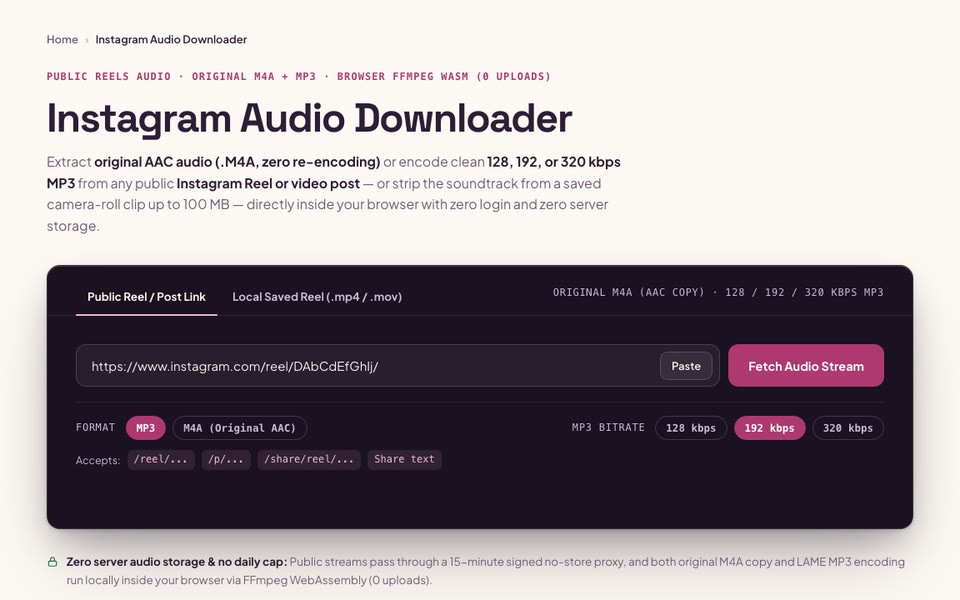
Extract original AAC audio (.M4A, zero re-encoding) or encode clean 128, 192, or 320 kbps MP3 from any public Instagram Reel or video post — with built-in audio preview before downloading, or strip audio from a saved clip up to 100 MB directly in your browser with zero login and zero server storage.
Drop a saved Instagram Reel or video here
Supports MP4, MOV, WebM, and MKV up to 100 MB · Encodes 100% inside your browser RAM
Zero server audio storage & no daily cap: Public streams pass through a 15-minute signed no-store proxy, and both original M4A copy and LAME MP3 encoding run locally inside your browser via FFmpeg WebAssembly (0 uploads).
01 · ARCHITECTURE
Why Browser-Local Extraction Beats Cloud Instagram Audio Converters
Most Instagram audio downloader sites route every Reel link or uploaded MP4 file through a shared cloud conversion queue. That forces you to wait behind pop-up ads, exposes personal voiceovers or client rough cuts to third-party disk storage, and frequently forces lossy double-compression even when you only wanted the untouched AAC soundtrack already sitting inside the Reel.
SaveByLink splits the problem cleanly at the browser boundary. For public instagram.com/reel/, /p/, and mobile /share/reel/ links, our edge worker checks public metadata and hands your browser a short-lived signed stream directly from Instagram’s official CDN (Cache-Control: no-store). Once those bytes reach your tab, our cached FFmpeg WebAssembly core either stream-copies the untouched native AAC track into Original M4A (-vn -c:a copy, zero re-encoding) or encodes a real libmp3lame 44.1 kHz MP3 (128, 192, or 320 kbps) entirely in local RAM with no fixed daily lookup quota. For local Reels already saved to your iPhone or laptop, not a single byte leaves your device.
Architectural comparison: cloud converters buffer files on remote disks and force re-encoding, whereas SaveByLink offers lossless AAC stream copy to M4A or local LAME MP3 in browser RAM.
02 · WORKFLOW & BITRATE TRUTH
How to Download Audio from an Instagram Reel in 3 Steps
- 01Copy a public Instagram Reel or video link (or open a saved clip): Inside the Instagram app or desktop browser, tap Share and choose Copy Link on any public Reel,
/share/reel/redirect, or feed video. Mobile captions pasted alongside the URL are stripped automatically. Already saved the MP4 to your camera roll? Switch to the Local Saved Reel tab instead. - 02Pick Original M4A (AAC copy) or MP3 (128, 192, or 320 kbps): Choose M4A (Original AAC) if you want the exact native Reel audio stream copied with zero extra lossy compression (smallest size and best choice before importing into CapCut, Premiere, or Audacity). Pick 192 kbps MP3 for universal playback across every phone, car stereo, and legacy player, or 128 kbps MP3 for compact spoken clips.
- 03Extract and preview locally before saving: Click Fetch Audio Stream (or Extract on a local clip). FFmpeg WebAssembly runs strictly in your browser tab, shows exact output bytes and codec metadata beside an inline player so you can verify the track before saving, and writes the clean
.m4aor.mp3straight to Downloads.
Original M4A vs MP3 Bitrates on Instagram Reels (Zero Fake Upscaling)
Honest audio engineering matters: Instagram typically compresses Reel soundtracks into stereo LC-AAC between 96 kbps and 128 kbps at 44.1 kHz or 48 kHz. No web tool can invent high-frequency detail that Instagram discarded during upload — and transcoding an already-lossy 128 kbps AAC stream into 320 kbps MP3 does not recover lost quality or create genuine editing headroom compared with keeping the native stream intact.
That is why SaveByLink gives you M4A (Original AAC) right on the main stage: FFmpeg executes -vn -c:a copy -movflags +faststart to wrap Instagram’s native AAC packets untouched with zero generation loss. Measured on our built-in 5.00-second 720p test clip (sample-demo-720p.mp4, 1,175,657 bytes, 44.1 kHz AAC, tested 2026-11-25), Original M4A stream copy outputs just 67,450 bytes (65.9 KB) — smaller and cleaner than re-encoding to 128k MP3 (81,230 B), 192k MP3 (121,772 B), or 320k MP3 (202,856 B). Choose 192 kbps MP3 whenever you specifically need universal .mp3 compatibility, or open our Browser Audio Cutter if you need uncompressed 16-bit PCM WAV for DAW mixing.
Swiss codec guide: Original M4A copies Instagram’s native ~96–128k AAC with zero re-encoding; 192 kbps MP3 preserves transparent universal playback; 320 kbps is the maximum MP3 frame ceiling.
03 · PRACTICAL SCENARIOS
Pick a Workflow Preset and Jump Straight to the Stage

04 · TECHNICAL SPECIFICATIONS
Measured Benchmark Matrix & Codec Architecture Reference
Table 1 below is open by default with real FFmpeg outputs measured 2026-11-25 on our built-in 5.00s sample clip (1,175,657 B); expand Table 2 for URL rules, troubleshooting boundaries, and privacy specs.
| Output Format | Measured 5s Sample | Approx. Size / Min | Acoustic Reality vs IG AAC | Best Use Case |
|---|---|---|---|---|
| M4A · Original AAC (-c:a copy) | 67,450 B (65.9 KB) | ~0.7–1.0 MB / min | Zero lossy re-encoding — native AAC packets copied bit-for-bit | Best for editing (CapCut/Premiere), Apple devices, smallest clean archive |
| 128 kbps MP3 (libmp3lame) | 81,230 B (79.3 KB) | ~0.96 MB / min | Matches native IG AAC voice band cleanly (1 lossy hop) | Spoken tutorials, language study, voice notes, lightweight sharing |
| 192 kbps MP3 (Default MP3) | 121,772 B (118.9 KB) | ~1.44 MB / min | Transparent universal MP3 preservation of IG stereo tracks | Everyday offline listening across Android, Windows, cars, MP3 players |
| 320 kbps MP3 (Max MP3) | 202,856 B (198.1 KB) | ~2.40 MB / min | Maximum MP3 frame ceiling (does not restore lost IG frequencies) | Only when an external tool strictly demands 320 kbps .mp3 files |
| Specification | SaveByLink Instagram Audio Downloader |
|---|---|
| Supported Public Links | instagram.com/reel/..., /reels/..., /p/..., and mobile /share/reel/... redirects (public video posts only) |
| Local File Inputs | MP4, MOV, WebM, MKV, AVI up to 100 MB (plus built-in 1-click 5.00s 720p sample clip) |
| Audio Extraction Engine | Client-side FFmpeg WebAssembly: lossless AAC copy (-vn -c:a copy → .m4a) + real libmp3lame 44.1 kHz MP3 (~31 MB cached once) + built-in inline audio preview before download |
| Server Storage & Quotas | 0 bytes stored — 15-min HMAC signed Cache-Control: no-store proxy; no fixed daily anonymous quota (local clips unlimited offline) |
| Troubleshooting Limits | Silent Reels (no audio stream), regionally copyrighted/muted tracks, deleted posts, and temporary upstream Instagram rate limits cannot yield audio |
| Explicit Non-Support | Private accounts, Close Friends Stories, photo-only carousels, and standalone /reels/audio/ music catalog pages without a public video post |
05 · MOBILE GUIDE & HONEST BOUNDARIES
Saving Instagram Audio on iPhone Safari, Android Chrome & Desktop
On iPhone and iPad (iOS Safari), open the public Instagram Reel, tap the paper-plane Share icon, tap Copy Link (including newer instagram.com/share/reel/... links), and paste straight into the stage above. Pick M4A (Original AAC) for native Apple Files / GarageBand / Voice Memos compatibility with zero re-encoding, or 192 kbps MP3 for universal playback — preview the extracted audio right in the stage player, then tap Download. Safari writes the finished file directly into Files → Browse → iCloud Drive → Downloads (or On My iPhone → Downloads).
On Android Chrome, Edge, and Firefox, extracted MP3 and M4A files land directly inside your device Downloads folder and show up automatically in VLC, YouTube Music Local Files, and CapCut. On Mac and Windows desktop, you can also drop previously saved Reels into the Local Saved Reel tab completely offline — avoiding the need to install VLC just to extract audio, and never entering your Instagram password on any site. Note that Instagram’s built-in Save audio button only bookmarks sounds inside the Instagram app (it never downloads an MP3), and Instagram’s own Download Reel button frequently strips licensed music.
Troubleshooting failed links quickly: first verify whether the Reel is actually silent (some muted or regionally copyright-blocked Reels ship with no audible track at all — FFmpeg will accurately report missing audio instead of generating a fake silent file). Second, confirm the link is a public video post (/reel/ID, /p/ID, or /share/reel/ID) rather than an Instagram Audio Library catalog page (/reels/audio/ID); if you discovered a sound on a catalog page, open any public Reel listed under that sound and copy that Reel’s URL instead. Third, if Instagram temporarily rate-limits anonymous public embeds, retry after a minute or save the Reel first and drop the MP4 into the Local tab. Need to trim a 15-second chorus or export WAV? Jump straight into our Browser Audio Cutter & Converter.
Three Honest Boundaries Before You Download
Public Video Posts Only
SaveByLink resolves only publicly accessible Instagram Reels and video posts visible without signing in. Private profiles, deleted posts, and login-gated clips are never bypassed.
No Stories, Silent Tracks, or DRM Catalogs
Close Friends Stories, photo-only carousels, regionally muted/silent Reels, and standalone /reels/audio/ music catalog pages without a public video stream are intentionally unsupported.
Creator Rights & Responsible Use
Audio copyrights always stay with the original artist or creator. Save tracks strictly for personal offline listening, study, accessibility, or archiving your own published content.
06 · FREQUENTLY ASKED QUESTIONS & RELATED TOOLS
Instagram Audio Downloader FAQ
How do I download audio from an Instagram Reel as Original M4A or MP3 without an app?
Copy the public Instagram Reel link (/reel/..., /p/..., or /share/reel/...), paste it into the Public Reel / Post Link tab above, pick M4A (Original AAC) for zero re-encoding or MP3 (128/192/320 kbps), click Fetch Audio Stream, preview the sound inline, and save. SaveByLink extracts the track locally in your browser via FFmpeg WebAssembly with no app install or login.
Does Instagram’s built-in "Save audio" button download an MP3 to my phone?
No. Tapping "Save audio" inside Instagram only bookmarks the sound inside your Instagram Saved collection so you can reuse it when filming new Reels — it never downloads an .mp3 or .m4a file to your device. Similarly, Instagram’s own Download Reel button often strips licensed music tracks.
Should I choose Original M4A (AAC copy) or 192/320 kbps MP3?
Choose M4A (Original AAC) when you want the cleanest possible copy for video editing (CapCut, Premiere) or Apple devices — it stream-copies Instagram’s native ~96–128 kbps AAC with -c:a copy and zero extra compression (65.9 KB vs 118.9 KB on our 5s test clip). Choose 192 kbps MP3 for universal playback across all players; 320 kbps MP3 cannot restore frequencies Instagram already removed and is only needed if another tool strictly requires 320k .mp3.
Why did my Instagram Reel link fail or say no audio stream was found?
Five real-world causes cover 99% of failures: (1) the Reel is silent or uses regionally copyright-restricted music muted by Instagram; (2) the account is private or the post was deleted; (3) you pasted a /reels/audio/ music-catalog URL instead of an individual /reel/ post; (4) the post is a photo-only carousel; or (5) Instagram temporarily rate-limited anonymous public lookups (wait a minute and retry, or drop a saved MP4 into the Local tab).
Does SaveByLink support mobile /share/reel/... links and have any daily download limit?
Yes to /share/reel/... public redirects and share captions — SaveByLink cleans the URL automatically. There is no fixed daily anonymous quota or account wall, and local file extraction in the second tab is completely unlimited and works offline once the ~31 MB WASM engine is cached.
Does SaveByLink upload my videos or store extracted Instagram audio on a server?
No. SaveByLink stores zero media on its servers. Public streams pass through a 15-minute signed no-store proxy, and both Original M4A demuxing and LAME MP3 encoding run 100% locally inside your browser tab via FFmpeg WebAssembly (0 uploads).
Can I extract audio from a Reel I already saved to my iPhone or Android phone?
Yes. Switch to the Local Saved Reel (.mp4 / .mov) tab in the stage above, choose your clip up to 100 MB (or click Try 720p sample to test instantly), and extract Original M4A or MP3 locally with zero uploads.
Can this tool download audio from private Instagram accounts or Instagram Stories?
No. SaveByLink strictly respects privacy settings and does not bypass login walls, private accounts, Close Friends Stories, or restricted posts.
How can I trim a specific 15-second chorus or export uncompressed WAV after extracting?
Once your Original M4A or MP4 is saved, open SaveByLink’s free Browser Audio Cutter (/en/audio-cutter) to visually select exact start/end timestamps, apply fade-in/out, and export 16-bit PCM WAV, MP3, or M4A locally.
Companion SaveByLink Tools & Guides
- All-in-One Video DownloaderPaste public links from TikTok, Instagram, Facebook, X, or Bluesky in one unified workbench.
- Instagram Video & Reels DownloaderSave full original HD progressive MP4 video from public Instagram Reels and feed posts.
- Video to MP3 ConverterConvert local videos or supported social links to 128, 192, or 320 kbps MP3 in your browser.
- Browser Audio Cutter & ConverterTrim extracted audio clips with fade-in/out or export uncompressed 16-bit PCM WAV and M4A locally.
- Compress Video to 20MB for DiscordShrink local MP4/MOV clips under Discord’s 20 MB free tier (plus 8/10/25 MB presets) offline.
- Guide: Download Instagram Reels in HDBest practices for keeping original Reel quality and audio sync across mobile and desktop.