
ATProto Public Video Tool · Zero Storage · Free
Bluesky Video Downloader
Need to save a public Bluesky clip without blurry HLS re-encoding or shady login prompts? Paste any public bsky.app post link to download the original progressive ATProto MP4 blob with sound, or extract 128–320 kbps MP3 locally in your browser with 0 uploads and zero server storage.
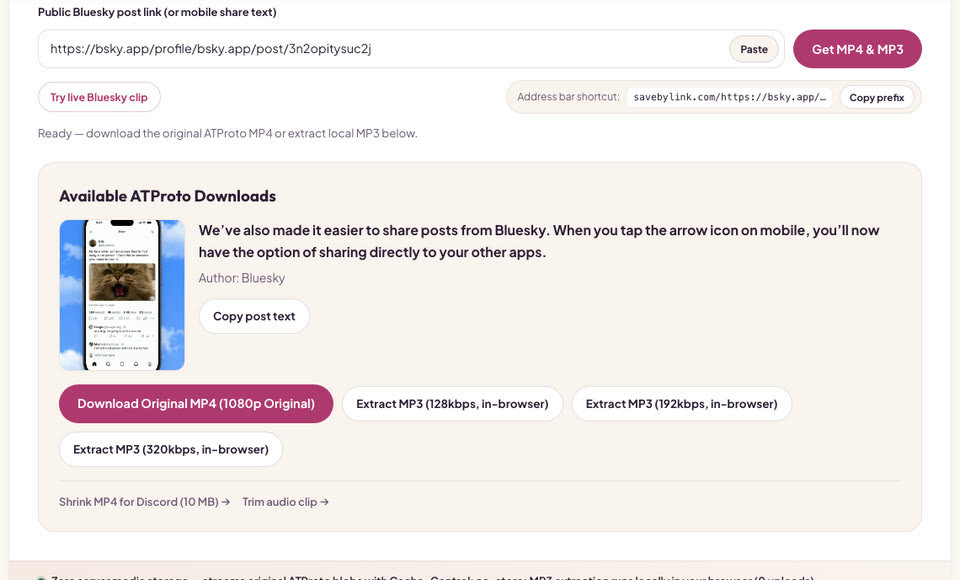
Available ATProto Downloads
Streams the immutable PDS MP4 blob via com.atproto.sync.getBlob with original sound intact.
Automatically resolves both native video embeds and recordWithMedia quote-post videos.
Extract 128, 192, or 320 kbps MP3 right inside your browser via FFmpeg WebAssembly.
No login, no watermarks, no server disk cache; signed stream links expire in 15 minutes.
How to Download a Bluesky Video in 3 Steps
- Copy the public
bsky.apppost link (or click Try live Bluesky clip): Open any public video post in the Bluesky iOS app, Android app, or desktop browser, tap Share, and select Copy Link. Even if your phone copies extra caption text alongside the URL, our Bluesky downloader automatically extracts thehttps://bsky.app/profile/…/post/…link—or tap Try live Bluesky clip above to test a real public post immediately. - Resolve via official public ATProto metadata: Paste the URL into Step 1 and press Get MP4 & MP3. SaveByLink queries Bluesky’s unauthenticated AppView API (
public.api.bsky.app) to resolve the creator’sdid:plcidentity and locate the exact video blob CID on their Personal Data Server (PDS), including videos embedded inside quote posts (recordWithMedia). - Save the original progressive MP4 or extract local MP3: Click Download MP4 to save the untouched progressive MP4 with original audio straight to your device—no watermark and no silent video-only chunks. If you only need the soundtrack or voiceover, click Extract MP3 (128, 192, or 320 kbps) to encode MP3 locally in your browser via FFmpeg WebAssembly with 0 uploads to any conversion server.
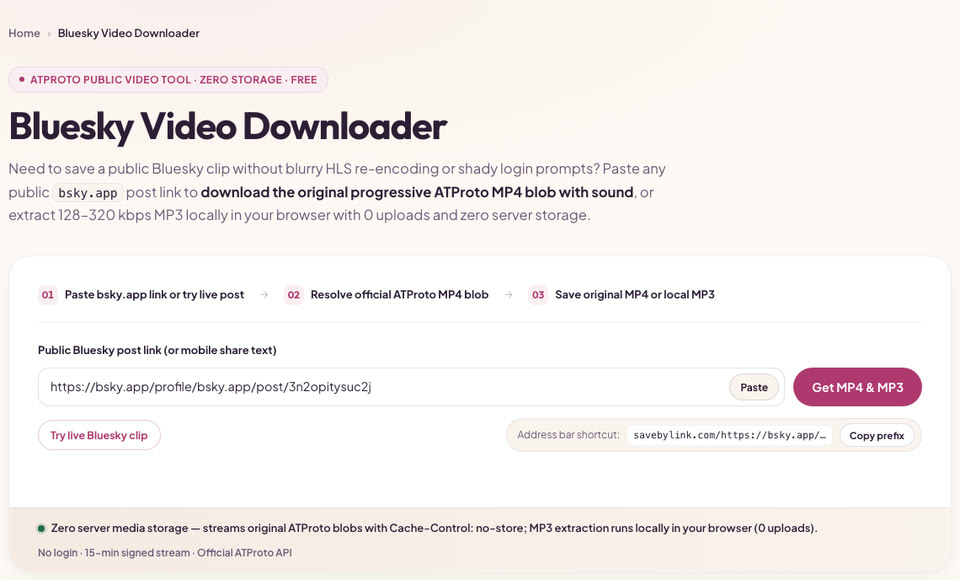
bsky.app link (or mobile share snippet), use the address-bar prefix shortcut, or test the live ATProto resolver in one click.Why Original ATProto MP4 Blobs Beat Re-Encoded HLS Scrapers
When you scroll the Bluesky feed on iOS, Android, or desktop web, the app streams segmented HTTP Live Streaming playlists (.m3u8 manifests referencing dozens of small .ts chunks) served by a transcoding video CDN. Most generic "Bluesky video downloaders" scrape those lower-bitrate HLS segments onto a remote server and stitch them back together—introducing extra queue latency, double-compression softness, out-of-sync audio tracks, and hidden server-side file logging.
Because Bluesky is built on the open Authenticated Transfer Protocol (ATProto), every native video uploaded to a Bluesky Personal Data Server (PDS) is stored as an immutable, content-addressed MP4 blob identified by its cryptographic CID. SaveByLink skips lossy HLS scraping completely: our edge resolver reads the public post record from public.api.bsky.app and streams the exact original MP4 blob from com.atproto.sync.getBlob through a verified, allowlisted, 15-minute signed Cloudflare edge proxy. You get full original resolution, intact audio, zero added watermarks, and instant playback across iPhone, Android, Windows, and macOS.
Supported Bluesky Post Types & URL Formats
Bluesky hosts several distinct media embeds across standard handles, custom-domain handles, and quote threads. Check the compatibility matrix below to know exactly what resolves directly through ATProto.
| Bluesky Post Type | Example URL / Handle | MP4 Original | Local MP3 | Resolution Behavior |
|---|---|---|---|---|
| Standard Native Video Post | bsky.app/profile/user.bsky.social/post/… | Yes (Original blob) | 128 / 192 / 320 kbps | Direct ATProto AppView → PDS getBlob stream |
| Custom-Domain Handle Post | bsky.app/profile/nytimes.com/post/… | Yes (Auto DID) | 128 / 192 / 320 kbps | Resolves custom domain to did:plc automatically |
| Quote Post With Video | recordWithMedia outer video embed | Yes (Original blob) | 128 / 192 / 320 kbps | Inspects nested media block and returns outer clip |
| Mobile Share Text + Link | Caption text + one https://bsky.app/… URL | Yes (Auto-cleaned) | 128 / 192 / 320 kbps | Extracts valid post URL automatically before resolving |
| Tenor GIF / External Embed | Tenor card, YouTube link, or photo-only post | Not supported | Not supported | Hosted outside Bluesky PDS; rejected cleanly with hint |
Tip: You can also jump directly from any desktop browser tab by typing savebylink.com/ right before https://bsky.app/… in your address bar.
Technical Architecture, Privacy & Explicit Boundaries
| Specification | SaveByLink Bluesky Video Downloader |
|---|---|
| Metadata Endpoint | Official unauthenticated Bluesky AppView API (public.api.bsky.app/xrpc/app.bsky.feed.getPostThread) |
| Video Stream Source | Original progressive MP4 blob via com.atproto.sync.getBlob on allowlisted bsky.social / host.bsky.network PDS hosts |
| Audio Extraction | 100% local in-browser FFmpeg WebAssembly (libmp3lame) at 128, 192, or 320 kbps — 0 uploads to any transcoding server |
| Privacy & Storage | 0 bytes stored Zero server disk storage; signed stream proxy URLs expire in 15 minutes with Cache-Control: no-store |
| Open Verification | Reproducible public ATProto lookup & stream checks documented in our MIT companion repo (WaterJason/savebylink-media-tools) |
| Explicit Boundaries | Public native Bluesky video posts only; does not access logged-out-restricted accounts, deleted posts, Tenor GIFs, or third-party self-hosted PDS domains |
Download Bluesky Videos on iPhone, Android, and Desktop
iPhone & iPad (Safari or Chrome): Open the public Bluesky video post, tap the share icon, and select Copy Link. Paste it into the box above (or tap Paste) and press Get MP4 & MP3. Tap Download MP4 and Safari saves the progressive MP4 straight into the Downloads folder inside Apple’s Files app—open Files, tap the video, and choose Share → Save Video to add it directly to your Photos camera roll.
Android & Desktop Browsers: On Android Chrome, Edge, or Firefox, tapping Download MP4 writes the original file straight into your device Downloads folder so it shows up immediately in Gallery or Google Photos. On Windows, macOS, and Linux, you can copy the post address or skip copy-pasting entirely by prepending https://savebylink.com/ before any bsky.app post URL in your address bar to land directly on pre-filled download buttons.
Post-Download Workflow: Shrink for Discord (20 MB) or Trim Audio Locally
Because Bluesky stores original high-bitrate MP4 uploads (often 15 MB to 50 MB for 60-second clips), sharing a saved Bluesky video directly into a free Discord channel (20 MB cap as of August 2026), GitHub Issue (10 MB), or Gmail attachment (25 MB) can still trigger an upload-size rejection. Right after downloading your original MP4, open our 20 MB Discord Video Compressor or Browser Video Compressor to shrink the file locally in your browser with zero uploads.
Need only a 12-second voice quote, podcast intro, or soundtrack snippet from a Bluesky clip? Either click Extract MP3 directly in the result card above for the full audio track, or load the downloaded MP4 straight into our Audio Cutter & Converter to trim exact 0.1-second start/end points with smooth fade-in/out and export MP3, WAV, or M4A offline.
Troubleshooting Bluesky Video Errors & Responsible Archiving
If a Bluesky link fails to resolve, verify three quick details. First, open the link in a private/incognito window: accounts that enabled Bluesky’s "Discourage apps from showing my account to logged-out users" privacy flag are intentionally omitted from public AppView responses, and SaveByLink strictly respects that setting. Second, confirm the post contains an uploaded native video rather than a Tenor GIF card or embedded YouTube/Vimeo link. Third, when viewing a reposted thread or quote-of-a-quote, copy the link of the specific post carrying the video attachment itself.
SaveByLink never asks for your Bluesky handle, app password, or session tokens — and works in any phone or desktop browser with zero extension or app install. Downloading a publicly visible post does not transfer copyright—use this Bluesky video downloader to back up your own creator posts, archive permitted clips for offline viewing, or reuse footage with explicit creator permission.
Frequently Asked Questions
Can I download Bluesky videos without logging in or installing an app?
Yes. SaveByLink runs directly in Safari, Chrome, Edge, and Firefox on iOS, Android, Windows, and macOS. You never enter a Bluesky password, create an account, or install a browser extension.
Why does the sound survive here when other Bluesky downloaders save silent videos?
Many basic tools scrape Bluesky’s segmented HLS (.m3u8) video playlist without muxing the separate audio stream. SaveByLink instead queries Bluesky’s public ATProto AppView API for the original video blob CID and streams the untouched progressive MP4 directly from the author’s PDS (com.atproto.sync.getBlob) with original sound intact and zero watermarks.
How does the savebylink.com/ URL shortcut work for Bluesky posts?
Simply type https://savebylink.com/ immediately in front of any public https://bsky.app/profile/…/post/… link in your browser address bar and press Enter. You will jump straight to this page with the post automatically resolved.
Can I extract MP3 audio from a Bluesky video?
Yes. After resolving a public video post, click any Extract MP3 button (128, 192, or 320 kbps). FFmpeg WebAssembly encodes the MP3 locally inside your browser tab with 0 uploads to any conversion server.
Does this Bsky downloader work with custom-domain handles like @nytimes.com?
Yes. Custom-domain handles automatically resolve to their underlying did:plc identifier through Bluesky’s public AppView API. Native videos stored on standard Bluesky PDS hosts (bsky.social and host.bsky.network) download cleanly.
Why does a Bluesky post say "Could not find a public video in this Bluesky post"?
This happens when a post contains only photos, a Tenor animated GIF card, an external YouTube/Vimeo embed, was deleted, or belongs to an account with logged-out visibility disabled.
Can I download videos inside Bluesky quote posts?
Yes. SaveByLink parses both direct app.bsky.embed.video embeds and recordWithMedia quote posts carrying native video attachments.
Does SaveByLink store copies of downloaded Bluesky videos?
No. Our Cloudflare edge proxy is 100% stream-only with zero disk storage. Signed download links expire after 15 minutes and include Cache-Control: no-store headers.
More Free Browser Tools & Guides
- Compress Video to 20MB (Discord)Shrink downloaded Bluesky MP4s under Discord’s 20 MB free tier (Aug 2026) or 10 MB / 25 MB caps locally via FFmpeg WASM — 0 uploads.Open 20 MB Compressor →
- Audio Cutter & ConverterTrim exact voice clips or soundtrack moments from any video into MP3, WAV, or M4A with smooth fade-in/out.Open Audio Cutter →
- X (Twitter) Video DownloaderResolve public X posts and save the highest-resolution progressive MP4 variant straight in your browser.Open X Downloader →
- Facebook Reels DownloaderSave public vertical Facebook Reels and fb.watch clips in original MP4 without login or watermarks.Open Reels Downloader →