
DISCORD 20 MB FREE TIER (AUG 2026) · 17.6 MB SAFE + AUTO BYTE CHECK · 0 UPLOADS
Compress Video to 20MB for Discord
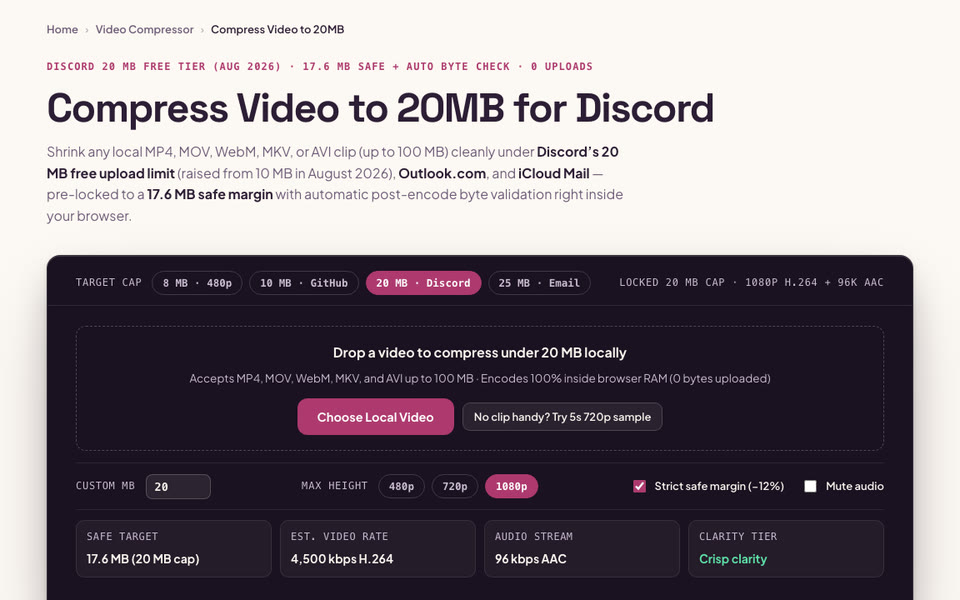
Shrink any local MP4, MOV, WebM, MKV, or AVI clip (up to 100 MB) cleanly under Discord’s 20 MB free upload limit (raised from 10 MB in August 2026), Outlook.com, and iCloud Mail — pre-locked to a 17.6 MB safe margin with automatic post-encode byte validation right inside your browser.
Drop a video to compress under 20 MB locally
Accepts MP4, MOV, WebM, MKV, and AVI up to 100 MB · Encodes 100% inside browser RAM (0 bytes uploaded)
Zero cloud uploads & auto byte verification: Your gaming highlights, bug reports, and iPhone clips never leave your device — FFmpeg WebAssembly (libx264) runs 100% locally and validates output bytes against 20,000,000 B automatically.
01 · ARCHITECTURE
Discord Raised Free Uploads to 20 MB in August 2026 — Why Naive Compressors Still Fail
In August 2026, Discord officially increased its free non-Nitro file upload limit from 10 MB to 20 MB (while Nitro Basic allows 50 MB and full Nitro allows up to 1 GB; Outlook.com and Apple iCloud Mail also cap direct attachments at 20 MB). Yet two engineering traps still cause rejected uploads: first, operating systems and upload gates disagree on decimal 20 MB (20,000,000 bytes = 19.07 MiB) versus binary 20 MiB (20,971,520 bytes); second, single-pass H.264 encoders routinely overshoot a naive 20.0 MB calculation by 4%–8% on rapid motion or MP4 container muxing overhead.
SaveByLink’s dedicated 20 MB stage solves both mechanically inside your browser tab. With Strict safe margin pre-enabled, our local FFmpeg WebAssembly pipeline budgets 0.88× of binary MiB (17.60 MiB ≈ 18.45 million bytes — −12% below binary 20 MiB and ~7.7% below strict decimal 20,000,000 bytes) at crisp 1080p with 96 kbps stereo AAC, converts iPhone 10-bit HEVC into universal yuv420p +faststart so Discord plays your clip inline immediately, and automatically validates the final output byte count — triggering a single proportional retry pass if an unusually chaotic clip ever lands above 20,000,000 bytes.
Safe-margin + automatic byte validation: targeting 17.60 MiB clears both strict decimal 20,000,000-byte gates and binary 20 MiB caps without uploading private clips.
02 · WORKFLOW & BITRATE MATH
How to Compress a Video to Under 20 MB for Discord in 3 Steps
- 01Load your clip locally (or click Try 5s 720p sample): Drop any MP4, MOV, WebM, MKV, or AVI file up to 100 MB into the deep-plum stage above. SaveByLink reads exact duration and dimensions straight from local disk without transmitting a single byte.
- 02Review the live Clarity Tier meter for your clip length: Notice the four live metrics update immediately for your duration. With Discord’s 20 MB limit, clips up to 60–75 seconds stay crisp at full 1080p (~2,300+ kbps); for 90–150 second clips, tap 720p (or check Mute audio on silent UI recordings to reclaim 96 kbps for sharper text).
- 03Encode offline, inspect verified bytes, and drop straight into Discord: Click Compress to 20 MB Locally. After FFmpeg WebAssembly finishes, check the exact byte count, the green
Fits 20 MB decimal cap ✓badge, and the inline video player — then save your universal H.264 MP4.
Decimal 20 MB (20,000,000 B) vs Binary 20 MiB (20,971,520 B) — And 1080p vs 720p Math
Because 20 MB offers double the headroom of Discord’s older 10 MB limit, most 15–60 second gaming highlights and screen demos no longer need to be crushed to 480p. Under our 17.60 MiB (~18.45 million bytes) safe target, a 45-second video receives roughly 3,107 kbps of H.264 bitrate plus 96 kbps stereo AAC — plenty for sharp 1080p Full HD.
Once a recording crosses 90–120 seconds, available video bitrate drops into the 1,100–1,500 kbps range. Switching Max Height from 1080p down to 720p reduces pixel area by 56%, letting the encoder keep fast gameplay and code text razor-sharp instead of smearing edges. Need a tighter ceiling for GitHub Issues (still strictly 10 MB) or legacy 8 MB bots? Switch directly to our Compress Video to 10MB or Compress Video to 8MB stages.
Precision cap clearance: budgeting 17.60 MiB (~18.45M bytes) clears both strict decimal 20,000,000-byte validators (19.07 MiB) and binary 20 MiB caps.
03 · PRACTICAL SCENARIOS
Pick Your 20 MB Compression Preset & Jump Straight to the Stage
04 · TECHNICAL SPECIFICATIONS
20 MB Bitrate Budget Table & Local Encoder Specifications
Table 1 below is open by default with exact bitrate math derived from our browser encoder formula (17.60 MiB safe target); expand Table 2 for codec flags and auto-retry specs.
| Clip Duration / Tier | Video Bitrate (17.6 MiB) | Audio Track | Best Max Height | Expected Visual Clarity |
|---|---|---|---|---|
| 15–30 seconds (Free 20 MB) | 4,500 kbps (capped max) | 96 kbps AAC | 1080p Full HD | Near-source crisp 1080p clarity |
| 45 seconds (Free 20 MB) | ~3,107 kbps | 96 kbps AAC | 1080p Full HD | Sharp gaming & high-detail UI demos |
| 60 seconds (Free 20 MB) | ~2,306 kbps | 96 kbps AAC | 1080p or 720p | Clean 1080p motion; 720p ultra-crisp |
| 2 minutes (Free 20 MB) | ~1,105 kbps | 96 kbps / Muted | 720p HD | Clean 2-minute walkthroughs at 720p |
| 3 minutes (Free 20 MB) | ~704 kbps | 64–96 kbps / Muted | 480p | Recommended 480p; trim dead intro/outro first |
| 5 minutes (Free 20 MB) | ~384 kbps | Muted or 64 kbps | 480p / Cloud link | Tight bitrate — share a cloud link for full HD |
| Discord Nitro Basic (50 MB) | Enter 50 MB (44.0 MiB safe) | 96 kbps AAC | 1080p Full HD | Custom MB supports 50 MB Nitro Basic cleanly |
| Discord Nitro (Up to 1 GB) | Up to 950 MB target | Source AAC | 1080p–4K | Browser caps input at 100 MB — use HandBrake |
| Specification | SaveByLink Compress Video to 20MB |
|---|---|
| Pre-Locked Cap & Units | 20 MB (Discord Aug 2026 free tier / Outlook / iCloud) — 0.88× binary MiB (17.60 MiB ≈ 18.45M B, −12% vs 20 MiB / ~7.7% vs decimal 20,000,000 B) |
| Auto Byte Validation | Inspects actual encoded bytes after pass 1; if Strict safe margin is enabled and output exceeds 20,000,000 B, automatically runs 1 tighter retry pass |
| Video Codec & Embed Flags | H.264 (libx264, -pix_fmt yuv420p, even dimensions, -movflags +faststart) for instant Discord inline playback |
| Audio Codec & Mute | Stereo AAC at 96 kbps (-ac 2) or complete audio removal (-an) for silent recordings |
| Input Formats & RAM Cap | Local MP4, MOV, WebM, MKV, and AVI up to 100 MB (plus built-in 5.00s 720p sample clip) |
| Privacy & Offline Reuse | 0 bytes uploaded (0 uploads) — cached ~31 MB FFmpeg WASM core runs offline in Airplane Mode; no daily limits |
05 · PLATFORM PLAYBOOK & HONEST BOUNDARIES
How to Minimize Quality Loss on Discord (All 3 Tiers, 60→30 FPS & iPhone HEVC)
Discord’s current 3-tier upload limits (as of August 2026): Free accounts allow 20 MB (target 17.6–19 MB), Nitro Basic allows 50 MB (enter 50 in Custom MB for a 44.0 MiB safe target), and full Nitro allows up to 1 GB (use desktop HandBrake for multi-hundred-MB clips). Dropping an Apple 10-bit HEVC .mov clip into Discord still renders an unplayable download box on Windows desktop clients — running it through SaveByLink converts it into universal 8-bit H.264 yuv420p with -movflags +faststart so every Discord, Outlook, iOS, and Windows recipient plays it inline immediately.
Five practical rules to minimize visible quality loss under 20 MB: (1) Trim dead intro/outro seconds first before compressing — cutting a 90s clip down to 45s doubles the available bitrate; (2) Compress from the original recording, never an already heavily compressed copy; (3) Prefer sharp 720p over smeared 1080p once a clip passes 75–90 seconds; (4) Drop 60 FPS gaming captures to 30 FPS when smooth motion isn’t essential (our fast browser preset preserves source FPS and scales height, while desktop HandBrake two-pass ABR lets you explicitly lock 30 FPS for intense 60fps gameplay); and (5) Mute silent UI/bug clips to hand 96 kbps back to video — or share a cloud link if you need multi-minute Full HD.
Not every destination has moved to 20 MB yet. GitHub Issues (free plan), many Slack/Zendesk support widgets, and older Discord bots still enforce a strict 10 MB or 8 MB limit — while Gmail and Yahoo Mail allow up to 25 MB direct attachments. Jump directly between our dedicated 10 MB Compressor, 8 MB Strict Compressor, 25 MB Email Compressor, or our full Video Compressor Hub whenever your target ceiling changes. Note on corporate Exchange relays: legacy SMTP adds ~33% Base64 MIME overhead, so enter 15–18 MB in Custom MB for zero bounce risk.
Three Honest Boundaries Before You Compress
100 MB Local Browser RAM Ceiling
Because WebAssembly holds input and output buffers in tab memory, clips above 100 MB are blocked to protect Safari and Chrome tabs from crashing. Use desktop HandBrake for multi-GB captures.
Single-Pass VBR + 1 Auto-Retry
Ultrafast single-pass libx264 targets ~17.60 MiB and automatically runs 1 proportional retry pass if output ever exceeds 20,000,000 bytes; extreme confetti/noise footage can still be trimmed further with Shrink 20% Smaller.
Keep Tab Active While Encoding
Mobile browsers pause background WebAssembly tabs to save battery. Keep this tab visible for the few seconds FFmpeg needs to complete local compression.
06 · FREQUENTLY ASKED QUESTIONS & RELATED TOOLS
Compress Video to 20MB FAQ
Did Discord really raise its free upload limit from 10 MB to 20 MB?
Yes. Discord increased its free non-Nitro file upload limit from 10 MB to 20 MB in August 2026. This page is pre-locked to 20 MB (with a 17.60 MiB safe margin at 1080p) so you get double the quality of old 10 MB compressors.
What is the difference between decimal 20 MB and binary 20 MiB?
Decimal 20 MB equals exactly 20,000,000 bytes (19.07 MiB), whereas binary 20 MiB equals 20,971,520 bytes. SaveByLink’s Strict safe margin budgets 17.60 MiB (~18.45 million bytes) and checks final output bytes against 20,000,000 B so your MP4 passes both decimal and binary validators.
What happens if the first compression pass still exceeds 20 MB?
When Strict safe margin is checked, SaveByLink inspects the actual encoded MP4 byte length immediately after pass 1. If a chaotic clip exceeds 20,000,000 bytes, it automatically triggers one tighter proportional retry pass (and steps resolution down if needed) before showing the final Download button.
Are my videos uploaded to a server during 20 MB compression?
No. 100% of decoding, scaling, and libx264 H.264 encoding runs inside your browser tab via FFmpeg WebAssembly (0 uploads, 0 server storage). Once the ~31 MB WASM core caches on first run, it even works offline in Airplane Mode.
Why does my iPhone MOV play inline on Discord after compressing here?
SaveByLink transcodes Apple 10-bit HEVC/MOV recordings into universal 8-bit H.264 (yuv420p) MP4 with +faststart metadata placement, which Discord desktop, iOS, and Android apps decode inline automatically.
How long can a 20 MB video stay sharp at 1080p vs 720p?
At 17.60 MiB safe target, clips up to 60–75 seconds stay crisp at full 1080p (~1,800–4,500 kbps). For 90–150 second clips, switch Max Height to 720p to keep fast motion and UI text sharp.
Can I also use this 20 MB preset for Outlook.com and iCloud Mail?
Yes. Both Outlook.com and Apple iCloud Mail enforce a 20 MB direct attachment limit before forcing OneDrive or Mail Drop links. For corporate Exchange servers with SMTP Base64 overhead, enter 16–18 MB in Custom MB.
When should I use 10 MB or 8 MB instead of 20 MB?
Use /en/compress-video-to-10mb for GitHub Issues (free tier remains 10 MB) or strict 10 MB portals, and /en/compress-video-to-8mb for legacy Discord bots, forums, and school LMS forms still capped at 8 MB.
Companion Video Size & Browser Media Tools
- All-in-One Video Compressor HubCompare 8 MB, 10 MB, 20 MB Discord, and 25 MB Email presets side by side offline.
- Compress Video to 10MB OnlinePre-locked 10 MB compressor for GitHub Issues and strict 10 MB portals (8.80 MiB safe target).
- Compress Video to 8MB for Discord & ForumsStrict 8 MB compressor pre-tuned to 480p and 7.04 MiB safe margin locally.
- Compress Video to 25MB for Gmail & EmailPre-locked 25 MB Gmail/Yahoo attachment compressor with SMTP MIME guidance.
- X (Twitter) GIF Downloader — Real .GIF & MP4Save native X MP4 loops or convert short clips into animated .GIFs locally.
- Browser Audio Cutter & ConverterTrim audio tracks with smooth fades and export MP3, WAV, or M4A offline.