
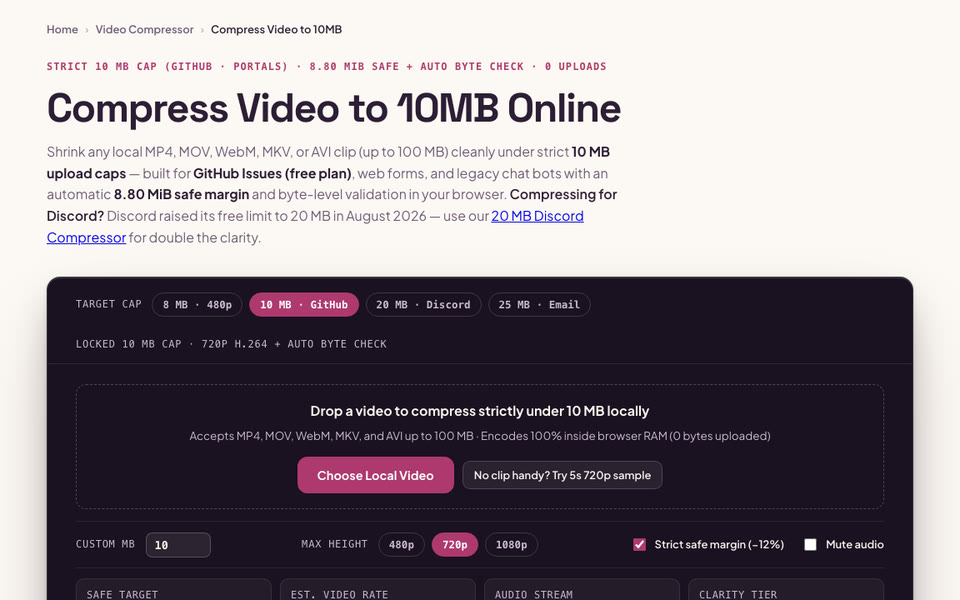
STRICT 10 MB CAP (GITHUB · PORTALS) · 8.80 MiB SAFE + AUTO BYTE CHECK · 0 UPLOADS
Compress Video to 10MB Online
Shrink local MP4, MOV, WebM, MKV, or AVI clips (≤100 MB) under strict 10 MB upload caps (GitHub Issues & web portals) with an 8.80 MiB safe margin + auto byte check. Using Discord? Free tier rose to 20 MB in Aug 2026 — try our 20 MB stage.
Drop a video to compress strictly under 10 MB locally
Accepts MP4, MOV, WebM, MKV, and AVI up to 100 MB · Encodes 100% inside browser RAM (0 bytes uploaded)
Zero cloud uploads & auto byte verification: Your bug reports, client demos, and iPhone clips never leave your device — FFmpeg WebAssembly (libx264) runs 100% locally and checks final bytes against strict decimal 10,000,000 B.
01 · ARCHITECTURE
Decimal 10 MB (10,000,000 B) vs Binary 10 MiB (10,485,760 B) — Why Naive Compressors Overshoot
Even after Discord raised its free upload limit from 10 MB to 20 MB in August 2026, strict 10 MB ceilings remain everywhere online: GitHub Issues (free plan), corporate support desks, LMS homework uploaders, and legacy chat bots reject clips the moment they cross the wall. Worse, platforms disagree on units — strict web validators reject anything above decimal 10 MB = 10,000,000 bytes (9.54 MiB), whereas binary caps allow 10 MiB = 10,485,760 bytes. A naive encoder targeting 10.0 MiB fails on decimal-MB portals every single time.
SaveByLink’s dedicated 10 MB stage fixes both the math and the privacy gap mechanically inside your browser tab. With Strict safe margin (−12%) pre-enabled, our local FFmpeg WebAssembly pipeline budgets 8.80 MiB (~9.23 million bytes) across your exact clip duration, converts iPhone 10-bit HEVC into universal yuv420p +faststart, and automatically checks the encoded MP4 byte count — running a single tighter proportional retry pass if an unusually chaotic clip ever exceeds 10,000,000 bytes.
Why safe-margin local math + byte verification wins: reserving 12% headroom plus an automatic retry check keeps H.264 encodes cleanly under strict decimal 10,000,000-byte walls.
02 · WORKFLOW & BITRATE MATH
How to Compress a Video to Under 10 MB Locally in 3 Steps
- 01Load your clip locally (or click Try 5s 720p sample): Drop any MP4, MOV, WebM, MKV, or AVI file up to 100 MB into the deep-plum stage above. SaveByLink reads exact duration and dimensions straight from local disk without transmitting a single byte.
- 02Check the live Clarity Tier meter for your clip length: Notice the four live metrics update immediately for your exact duration. Clips under 45 seconds shine at 720p with crisp clarity (~1,500+ kbps); if a 60–90 second recording drops into the tight tier, click 480p or check Mute audio on silent GitHub bug repros to reclaim 64 kbps for sharper text.
- 03Encode offline, inspect verified bytes, and save: Click Compress to 10 MB Locally. Keep the tab active until FFmpeg WebAssembly finishes, verify exact output bytes and the green
Fits 10 MB decimal cap ✓badge alongside the inline player, then download your ready-to-upload MP4.
Clip Length vs Resolution: Getting the Sharpest Possible 10 MB Video
Fitting a video under 10,000,000 bytes is pure bits-per-pixel math. A 20-second screen recording at 8.80 MiB enjoys roughly 3,540 kbps of H.264 video bitrate — more than enough to look razor-sharp at 720p (or even 1080p for low-motion UI captures). Stretch that same 8.80 MiB budget across a 75-second clip and video bitrate falls to roughly 897 kbps, where 720p starts showing macro-blocking during fast camera pans.
Lowering max height from 720p to 480p slashes pixel count by 56%, letting the encoder spend over twice as many bits per pixel so motion stays clean and UI text remains readable. For silent GitHub Issues bug repros or OBS recordings without commentary, ticking Mute audio reallocates another 64 kbps directly into video frames. Uploading to Discord instead? Remember Discord raised free uploads to 20 MB in August 2026 — jump straight to our Compress Video to 20MB stage, or use Compress Video to 8MB for older 8 MB forums.
Precision clearance: targeting 8.80 MiB (~9.23 million bytes) leaves headroom below both strict decimal 10,000,000-byte caps (9.54 MiB) and binary 10 MiB limits.
03 · PRACTICAL SCENARIOS
Pick Your 10 MB Compression Preset & Jump Straight to the Stage
04 · TECHNICAL SPECIFICATIONS
10 MB Duration Bitrate Table & Local Encoder Specs
Table 1 below is open by default with exact 8.80 MiB bitrate math by clip length; expand Table 2 for byte-validation auto-retry and codec flags.
| Clip Duration | Video Bitrate (8.80 MiB) | Audio Track | Best Max Height | Expected Visual Clarity |
|---|---|---|---|---|
| 10–20 seconds | 3,540–4,500 kbps | 64 kbps AAC | 720p or 1080p | Near-lossless crisp clarity |
| 30 seconds | ~2,338 kbps | 64 kbps AAC | 720p HD | Crisp clarity — ideal 10 MB sweet spot |
| 45 seconds | ~1,537 kbps | 64 kbps AAC | 720p HD | Clean balanced motion & readable UI |
| 60 seconds | ~1,137 kbps | 64 kbps AAC | 720p (or 480p action) | Solid quality; mute if silent capture |
| 90 seconds | ~736 kbps | 64 kbps / Muted | 480p | Recommended 480p to prevent blockiness |
| Specification | SaveByLink Compress Video to 10MB |
|---|---|
| Pre-Locked Cap & Units | 10 MB strict cap with 0.88× binary MiB safe target (8.80 MiB ≈ 9.23M B — −12% vs 10 MiB / ~7.7% vs decimal 10,000,000 B) |
| Auto Byte Validation | Checks actual encoded MP4 bytes after pass 1; if Strict safe margin is on and output exceeds 10,000,000 B, automatically runs 1 tighter retry pass |
| Video Codec & Embed Flags | H.264 (libx264, -pix_fmt yuv420p, even dimensions, -movflags +faststart) for universal inline playback |
| Audio Codec & Mute | Stereo AAC at 64 kbps (-ac 2) or complete audio removal (-an) for silent recordings |
| Input Formats & RAM Cap | Local MP4, MOV, WebM, MKV, and AVI up to 100 MB (plus built-in 5.00s 720p sample clip) |
| Privacy & Offline Reuse | 0 bytes uploaded (0 uploads) — cached ~31 MB FFmpeg WASM core runs offline in Airplane Mode; no daily cap |
05 · PLATFORM PLAYBOOK & HONEST BOUNDARIES
Passing Strict 10 MB Forms, GitHub Issues & Fixing iPhone MOV Embeds
On GitHub Issues (free plan), Jira/Zendesk ticket portals, and enterprise web forms, attaching a 14 MB iPhone .mov or macOS screen recording fails twice: first on the strict 10 MB (10,000,000-byte) wall, and second when Windows reviewers cannot play Apple’s 10-bit HEVC stream inline.
Running your clip through SaveByLink’s 10 MB stage automatically transcodes it to universal 8-bit H.264 yuv420p, moves the MP4 moov atom to the front (+faststart), and verifies the final byte count against 10,000,000 B entirely inside your browser tab (0 uploads).
Targeting another limit? Jump directly to our 20 MB Discord Free-Tier Compressor (updated for Discord’s August 2026 limit increase), our 8 MB Strict Video Compressor for legacy forums, our 25 MB Gmail & Email Compressor, or our full Video Compressor Hub.
Three Honest Boundaries Before You Compress
100 MB Local Browser RAM Ceiling
Because WebAssembly holds input and output buffers in tab memory, clips above 100 MB are blocked to protect Safari and Chrome tabs from crashing. Use desktop HandBrake for multi-GB captures.
Single-Pass VBR + 1 Auto-Retry
Ultrafast single-pass libx264 targets ~8.80 MiB and automatically runs 1 proportional retry pass if output ever exceeds 10,000,000 bytes; extreme high-motion clips can still be nudged smaller with Shrink 20% Smaller.
Keep Tab Active While Encoding
Mobile browsers pause background WebAssembly tabs to save battery. Keep this tab visible for the few seconds FFmpeg needs to complete local compression.
06 · FREQUENTLY ASKED QUESTIONS & RELATED TOOLS
Compress Video to 10MB FAQ
Is Discord still limited to 10 MB, or should I use 20 MB now?
Discord officially raised its free non-Nitro upload limit from 10 MB to 20 MB in August 2026 — so if you are posting on Discord, use our dedicated /en/compress-video-to-20mb page (or tap the 20 MB · Discord pill above) for much sharper video. Keep this 10 MB stage for GitHub Issues (free plan remains 10 MB), strict 10 MB web forms, and older bots.
Why does SaveByLink target 8.80 MiB for a 10 MB limit (decimal MB vs binary MiB)?
Strict web uploaders enforce decimal 10 MB = 10,000,000 bytes (9.54 MiB), while binary systems allow 10 MiB = 10,485,760 bytes. Budgeting 8.80 MiB (~9.23 million bytes) absorbs MP4 container overhead and VBR spikes so most clips clear both decimal and binary 10 MB walls cleanly.
What happens if the first pass still exceeds 10,000,000 bytes?
With Strict safe margin enabled, SaveByLink checks the actual output MP4 byte size after pass 1 and automatically runs 1 tighter proportional retry pass (stepping down resolution if needed). You can also click Shrink 20% Smaller beneath the preview for extra headroom.
Are my videos uploaded to a server during 10 MB compression?
No. 100% of video decoding, scaling, and libx264 H.264 encoding runs inside your browser tab via FFmpeg WebAssembly (0 uploads). You can confirm zero outbound media traffic in browser DevTools or run offline in Airplane Mode once cached.
Why does my iPhone MOV video play inline on GitHub and Discord after compressing here?
SaveByLink converts iPhone 10-bit HEVC/MOV recordings into universal 8-bit H.264 (yuv420p) MP4 with +faststart metadata placement, which desktop browsers, GitHub Issues, Slack, and Discord decode inline automatically.
How long can a 10 MB video be before quality looks blurry?
At 720p, clips up to 45–50 seconds look sharp under 10 MB (~1,400–3,500 kbps). For 60–90 second clips, switch Max Height to 480p (and check Mute audio if silent) to keep frames clean and readable.
Can I use this 10 MB compressor for GitHub Issues and QA bug reports?
Yes. GitHub Issues enforces a strict 10 MB attachment ceiling for free accounts. Checking Mute audio at 720p gives crisp, lightweight screen-recording bug repros with zero cloud upload of proprietary code.
Why is there a 100 MB input file limit?
WebAssembly runs inside browser tab memory. Capping input clips at 100 MB keeps mobile Safari and desktop Chrome stable without out-of-memory crashes; larger 4K captures should use desktop HandBrake.
Companion Video Size & Browser Media Tools
- Compress Video to 20MB for DiscordUpdated for Discord’s August 2026 20 MB free tier — 17.6 MiB safe margin at 1080p offline.
- All-in-One Video Compressor HubCompare 8 MB, 10 MB, 20 MB Discord, and 25 MB Email presets side by side.
- Compress Video to 8MB for Forums & Legacy BotsDedicated 8 MB strict-cap compressor pre-tuned with 7.04 MiB safe margin and 480p scaling.
- Compress Video to 25MB for Gmail & EmailPre-locked 25 MB email attachment compressor with SMTP MIME overhead awareness.
- X (Twitter) GIF Downloader — Real .GIF & MP4Save native X MP4 loops or convert short clips into animated .GIFs locally.
- Browser Audio Cutter & ConverterTrim audio tracks with smooth fades and export MP3, WAV, or M4A offline.