
Local FFmpeg WebAssembly · Zero Uploads · Free
Video Compressor for Discord & Email
Need a clip to fit under Discord’s 20 MB free limit (updated August 2026), GitHub’s 10 MB cap, or Gmail’s 25 MB limit without waiting on cloud queues? Drop any MP4, MOV, WebM, or MKV file to compress video to an exact MB target in universal H.264 MP4 with live bitrate preview and automatic decimal byte validation. Everything runs locally via FFmpeg WebAssembly—your video never leaves your device.
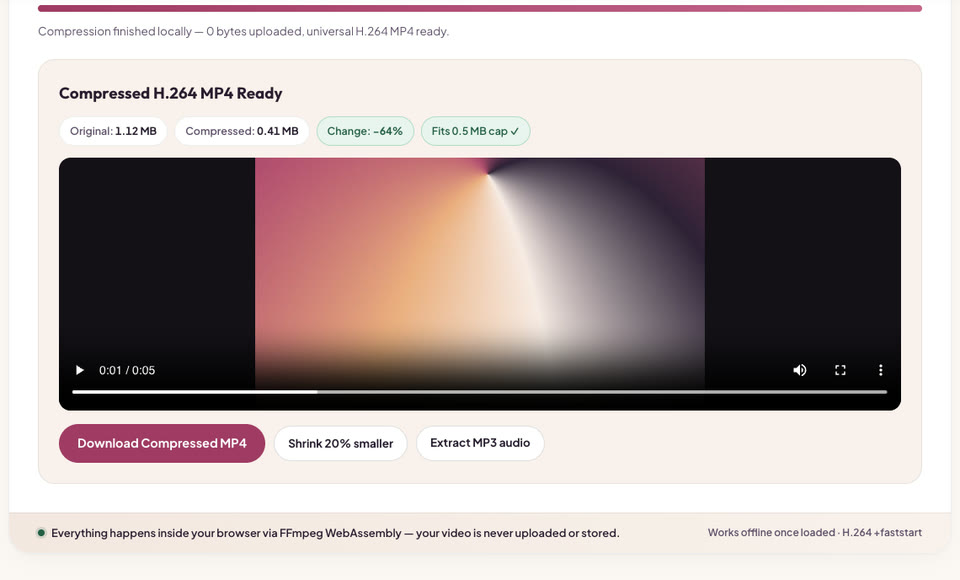
Compressed H.264 MP4 Ready
One-click safe-margin caps for Discord 20 MB free tier, GitHub 10 MB, strict 8 MB, and Gmail 25 MB.
Processes MP4, MOV, WebM, MKV, and AVI clips safely inside browser tab memory.
Universal libx264 yuv420p MP4 plays inline on Discord, iOS, Android, and desktop mail.
Runs 100% client-side in FFmpeg WebAssembly; private clips never touch any server.
How to Compress a Video for Discord & Email in 3 Steps
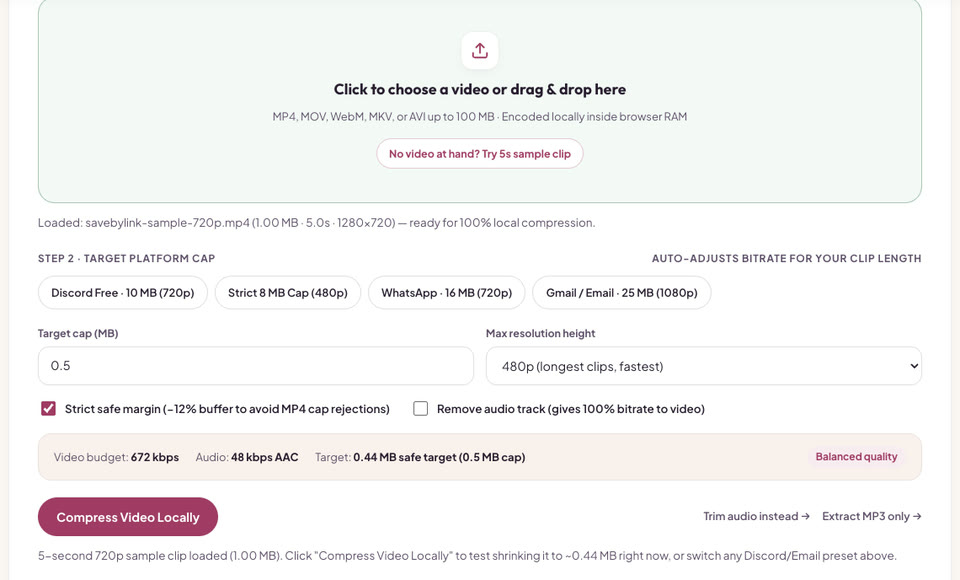
- Load a local clip (or click the built-in 5s sample): Drag an MP4, MOV, WebM, MKV, or AVI file (up to 100 MB) into Step 1 above—or tap No video at hand? Try 5s sample clip to test the entire offline workflow immediately. SaveByLink reads duration and resolution locally in your browser without sending a single byte over the network.
- Pick your cap and inspect the live bitrate budget: Click Discord Free · 20 MB (1080p) (updated for Discord’s August 2026 limit increase), GitHub / Strict · 10 MB (720p), Strict 8 MB Cap (480p), or Gmail / Email · 25 MB (1080p), or enter any custom cap from 0.5 MB to 95 MB (for example
50for Discord Nitro Basic or19for corporate Outlook/Exchange). Keep Strict safe margin enabled to reserve a 12% binary MiB (~7.7% decimal MB) buffer with automatic post-encode byte verification; if a long clip shows a tight bitrate budget, trim dead seconds first, drop max height to 720p/480p, or mute silent recordings. - Encode offline and save your universal MP4: Press Compress Video Locally and keep the browser tab active while FFmpeg WebAssembly outputs an H.264 MP4 (
libx264+yuv420p+-movflags +faststart). Verify the compressed size pill and inline player preview, then save the file directly to your device or click Shrink 20% smaller if you want extra headroom.
Why Cloud Video Compressors Fail (And How Local FFmpeg Solves It)
Most "free online video compressors" break in four predictable ways. First, they force you to upload a 70 MB screen recording over slow residential upload bandwidth, queue behind paywalls, and download the output back—often retaining private bug repros, client drafts, or family videos on opaque third-party storage. Second, naive single-pass tools calculate bitrate straight against 20.0 MB or 10.0 MB without accounting for decimal-vs-binary units, MP4 container muxing overhead, and variable-bitrate spikes, producing a 20.4 MB or 10.28 MB file that Discord or GitHub immediately rejects.
Third, many quick converters leave iPhone HEVC/10-bit pixel formats intact or place the MP4 moov metadata atom at the end of the file, which causes Discord and Slack to render a gray downloadable box instead of an instant playable embed. SaveByLink solves all four mechanically inside your browser sandbox: once the cached ~31 MB WebAssembly core loads, our local FFmpeg pipeline enforces -pix_fmt yuv420p, even-dimension scaling (trunc(min(height,ih)/2)*2), -movflags +faststart, and a default 0.88× binary MiB safe margin (with automatic post-encode decimal byte checking and 1-step retry)—with zero network upload and instant offline reuse.
Platform Upload Limits & Recommended Video Compression Presets
Different chat apps, mail providers, and issue trackers enforce strict raw-byte or MIME-encoded ceilings. Use the reference matrix below to match your destination cap and clip duration before pressing compress.
| Platform / Use Case | Hard Upload Cap | Safe Target MB | Best Resolution | Ideal Clip Length |
|---|---|---|---|---|
| Discord Free Tier (Aug 2026) | 20 MB per file | 17.6 MiB (~18.45M B) | 1080p (720p if >75s) | Up to 90–120 seconds |
| Discord Nitro Basic | 50 MB per file | 44.0 MiB (~46.1M B) | 1080p Full HD | Up to 3–5 minutes |
| Discord Nitro (Desktop) | Up to 1 GB | 950 MB (HandBrake) | 1080p–4K | Use desktop HandBrake (>100 MB) |
| GitHub Issues / Strict 10 MB | 10 MB hard cap | 8.80 MiB (~9.23M B) | 720p (480p if >50s) | Up to 45–60 seconds |
| Legacy Discord Bots / Forums | 8 MB hard cap | 7.04 MiB (~7.38M B) | 480p (mute if silent) | Up to 40–65 seconds |
| Outlook.com / iCloud Mail | 20 MB direct | 17.6 MiB (~18.45M B) | 1080p or 720p | Up to 2 minutes |
| Gmail / Yahoo Mail | 25 MB total message | 22.0 MiB (~23.07M B)* | 1080p (720p if >2m) | Up to 2–3 minutes |
*Gmail’s 25 MB limit covers the entire message including other attachments (22.0 MiB ≈ 23 MB leaves room for extra files), while older corporate SMTP gateways add ~33% Base64 MIME overhead—type 19 MB for strict Exchange relays. To minimize visible quality loss, trim dead footage first, compress from the original recording (not an already-compressed copy), step 1080p down to 720p on longer clips, and use HandBrake or Shutter Encoder when you need two-pass 30 FPS capping on heavy 60 FPS clips over 100 MB.
Technical Architecture & Codec Specifications
| Specification | SaveByLink Browser Video Compressor |
|---|---|
| Execution Engine | FFmpeg WebAssembly running 100% inside your browser tab (cached after first load; works offline) |
| Output Video & Audio | H.264 (libx264, yuv420p, even dimensions) + stereo AAC (48/64/96 kbps) + -movflags +faststart |
| Privacy & Storage | 0 bytes uploaded Zero cloud upload, zero server storage, zero watermarks, zero daily limits |
| Input Formats & RAM Cap | Local MP4, MOV (iPhone/QuickTime), WebM, MKV, and AVI files up to 100 MB |
| Safe-Margin Math | Default −12% container headroom (0.88× cap) with live video kbps & clarity tier feedback before encoding |
| Explicit Boundaries | Single-pass bitrate targeting approximates tiny MB caps on very long clips; files over 100 MB require desktop HandBrake or native FFmpeg |
Compress Video to 20 MB for Discord, Compress Video to 10 MB & 8 MB Video Compressor Caps
Discord officially raised its free non-Nitro upload limit from 10 MB to 20 MB per file in August 2026, giving gaming highlights and screen demos double the bitrate headroom. Pick Discord Free · 20 MB (1080p) above — or open our pre-locked Compress Video to 20MB for Discord stage — to target a 17.60 MiB (~18.45M bytes) safe margin with automatic decimal byte validation.
Still hitting a strict 10 MB ceiling on GitHub Issues (free tier) or web forms? Click GitHub / Strict · 10 MB (720p) — or jump straight into our pre-locked Compress Video to 10MB workbench — to compress video to 10 MB with an 8.80 MiB safe budget that clears strict 10,000,000-byte gates. For older Discord bots, forums, or LMS forms capped at 8 MB, click the 8 MB Video Compressor preset (Strict 8 MB Cap · 480p) or open our dedicated Compress Video to 8MB page. Writing universal yuv420p + +faststart ensures Discord and GitHub play iPhone HEVC clips inline immediately.
Compress Video to 25 MB for Gmail & Email Attachments
Gmail, Outlook.com, and Yahoo Mail cap standard attachments at 25 MB, which immediately blocks modern 1080p/4K smartphone MOV files and macOS screen recordings. Selecting Gmail / Email · 25 MB (1080p)—or using our dedicated Compress Video to 25MB for Gmail & Email stage—lets you compress video to 25 MB right on your laptop or phone, keeping sensitive client demos, legal walk-throughs, and family clips off cloud servers.
Because SMTP email gateways encode binary attachments in base64 (expanding file payload by ~30% in transit), keeping Strict safe margin checked—or typing 19–20 in Target Cap when emailing strict corporate Exchange servers—gives your MP4 attachment clean delivery headroom while preserving sharp 1080p detail.
Honest Limits: Browser RAM Caps & Desktop Alternatives
Running FFmpeg inside WebAssembly gives you instant zero-upload privacy on any phone or laptop, but it executes single-threaded inside browser tab memory. Capping input clips at 100 MB prevents mobile Safari and Chrome from terminating the tab with an out-of-memory error, and keeps typical 10–60 second clips fast to process.
For 4K multi-gigabyte camera reels, hour-long lectures, or batch transcoding, native desktop software like HandBrake or command-line FFmpeg with hardware encoders (Apple VideoToolbox, NVIDIA NVENC, Intel Quick Sync) will always run faster and handle multi-GB files without browser RAM constraints. SaveByLink is purpose-built for the 90% everyday case: shrinking a 10–100 MB clip right now without installing software or uploading private media.
Frequently Asked Questions
How do I compress a video for Discord free tier (20 MB as of August 2026) or GitHub (10 MB)?
Discord raised its free non-Nitro upload cap from 10 MB to 20 MB in August 2026. Drop your video (up to 100 MB) into Step 1, select "Discord Free · 20 MB (1080p)" — or "GitHub / Strict · 10 MB (720p)" for strict 10 MB platforms — keep Strict safe margin checked, and click Compress Video Locally.
Are my videos really never uploaded? How can I verify this?
Yes—100% of decoding, scaling, and H.264 encoding runs inside your browser tab via FFmpeg WebAssembly. You can verify this yourself by opening your browser DevTools Network tab during compression (zero outbound media requests) or turning on Airplane Mode once the page and WASM engine have loaded.
Why do compressed videos overshoot strict caps elsewhere, and how does auto byte validation help?
Decimal upload caps (e.g. 10,000,000 B = 9.54 MiB or 20,000,000 B = 19.07 MiB) are stricter than binary MiB, and single-pass VBR encoders can spike by 3–10%. SaveByLink reserves a −12% safe margin (0.88×) and checks final output bytes after pass 1 — automatically running 1 tighter retry pass if a clip ever exceeds the strict decimal cap.
How can I guarantee a clip fits under a strict 8 MB upload limit?
Select "Strict 8 MB Cap (480p)" with Strict safe margin enabled (which targets ~7.0 MB). If your clip has rapid game motion or exceeds 60 seconds, check "Remove audio track" on silent captures or click "Shrink 20% smaller" after previewing.
Can I compress iPhone MOV or screen recordings to under 25 MB for Gmail?
Yes. Drop any local MOV, MP4, WebM, MKV, or AVI file up to 100 MB and pick "Gmail / Email · 25 MB (1080p)"—or enter 20 MB for strict corporate email gateways. SaveByLink converts Apple HEVC/MOV clips into universal H.264 yuv420p MP4 playable on Windows, Android, and iOS.
When should I lower resolution to 480p or mute audio?
Watch the live clarity pill in Step 2: when your clip duration pushes estimated video bitrate below ~450 kbps, dropping from 720p to 480p cuts pixel count by more than half so each frame stays sharp instead of blocky. Muting silent UI bug recordings frees another 64–96 kbps straight into video sharpness.
Why is there a 100 MB file size cap, and what if my video is larger?
WebAssembly allocates input and output video buffers inside your browser tab’s RAM. Enforcing a 100 MB ceiling prevents iOS Safari and mobile Chrome tabs from crashing. For multi-gigabyte 4K footage or long recordings, use desktop HandBrake or native FFmpeg with hardware acceleration.
Is there any watermark, signup requirement, or daily compression limit?
No. Because all encoding runs locally on your own device rather than on paid cloud GPU servers, SaveByLink adds zero watermarks, asks for zero login, and imposes no daily compression limit.
More Free Browser Tools & Guides
- Social Media Video DownloaderSave public HD MP4 videos and original audio from TikTok, Instagram, Facebook, X, and Bluesky straight in your browser.Open Downloader Hub →
- Audio Cutter & ConverterTrim MP3, WAV, M4A, or extract clipped audio from local MP4/MOV videos with 0.1s precision and fade-in/out—zero uploads.Open Audio Cutter →
- Video to MP3 ConverterConvert supported public links or local videos up to 100 MB into 128, 192, or 320 kbps MP3 locally via FFmpeg WASM.Open MP3 Converter →
- Bluesky Video DownloaderFetch original 1080p ATProto MP4 blobs with sound from public bsky.app posts, then shrink them here for Discord or email.Open Bluesky Downloader →